PhotoCraft is not Adobe Photoshop. This is opencreativeapps.com, an independent guide and small orchard. We are not getartcraft.com, not the ArtCraft team and not an Adobe site. We do not host, sell or distribute installers. Every download path below goes to the official page or the storytold GitHub repository.
PhotoCraft download: official installers & GitHub
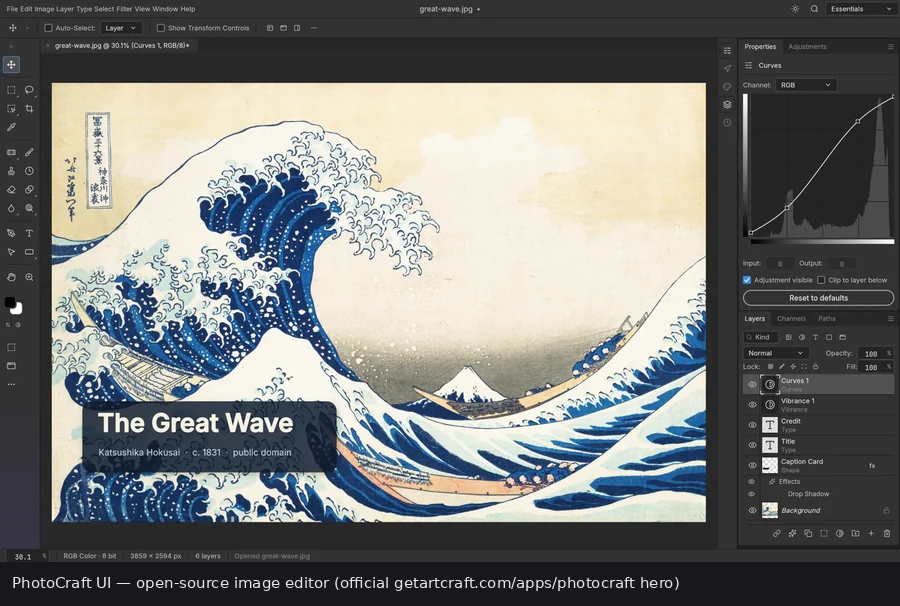
TL;DR: Download PhotoCraft from getartcraft.com/apps/photocraft or the official GitHub Releases. It is a free, open-source, early-alpha image editor from the ArtCraft / storytold team — not Adobe Photoshop and not a Creative Cloud app. On 3 November 2026 the official page offered standalone 0.19.0 and Launcher v0.13.0, while GitHub published v0.20.1. Both are official; pick one channel, verify SHA-256, and do not use a lookalike download portal.
Official PhotoCraft pageGitHub storytold/photocraftGitHub releases & SHA256SUMSFull download safety guide
Page checked: · Site stamp: · English: this page · 中文: 下载安装指南
Short answers
These are the questions people usually have before they click a download button. The longer sections below cover each platform, checksum workflow and the fake-site problem.
| Question | Short answer |
|---|---|
| Official download | getartcraft.com/apps/photocraft is the easiest official page. Every build is on github.com/storytold/photocraft/releases. The suite installer is the ArtCraft Launcher. |
| Price and licence | Free, open source, MIT OR Apache-2.0. No PhotoCraft subscription and no licence key. ArtCraft AI credits are a separate product. |
| Adobe account | None. PhotoCraft is not Adobe Photoshop and is not part of Creative Cloud. Do not sign in to an “Adobe PhotoCraft” page — that product does not exist. |
| Desktop platforms | Windows x64, ARM64 and x86 (MSI or portable); macOS universal DMG for Apple silicon and Intel; Linux AppImage, deb, rpm, tarball, Flatpak and Arch packages; FreeBSD x86_64. |
| No-install paths | The ArtCraft Launcher installs and updates PhotoCraft. A self-hosted WebAssembly zip runs in a modern browser. There is no official hosted PhotoCraft web app. |
| Production readiness | Early alpha. The authors say it is not yet a daily professional Photoshop replacement. Test on copies before a client deadline. |
Where to download PhotoCraft safely (official only)
There are five official destinations, and only one of them is a download button you should press first. This site links no mirrors, no “download managers” and no file lockers. The official page and GitHub both serve the same release assets; GitHub is where the files and checksums actually live.
| Destination | What it is | Use it for |
|---|---|---|
| getartcraft.com/apps/photocraft | The curated official app page. It offered standalone 0.19.0, the ArtCraft Launcher v0.13.0, macOS, Windows, Linux and FreeBSD files, a web build and a SHA-256 checksums link. | Start here if you want the fewest choices and a page written for normal users. |
| github.com/storytold/photocraft | The source repository, README, issue tracker and documentation. This is the place to inspect the code or report a problem. | Source, build instructions, known issues and release notes. |
| github.com/storytold/photocraft/releases | Every build and every earlier version. When checked, the newest release was v0.20.1, published on 3 November 2026, with SHA256SUMS.txt and per-asset SHA-256 digests. | The newest build, older versions, checksums and exact asset names. |
| getartcraft.com/download | The download page for ArtCraft, the separate AI image and video studio. It is not the PhotoCraft installer. | Only if you also want ArtCraft. Do not expect it to install PhotoCraft. |
| github.com/storytold/craft-launcher/releases | Official ArtCraft Launcher releases. The PhotoCraft page offered Launcher v0.13.0 when checked; GitHub’s newest launcher tag was v0.14.0. | The suite installer, or a launcher update when the app page lags. |
The domain check is simple: an official PhotoCraft download starts at getartcraft.com or github.com/storytold. GitHub may hand the file to its release-asset host after you click, but the page you start from should be one of those two. A shortener, a Discord attachment, a Telegram channel, a Google Drive folder or a “direct download” button on an unrelated domain is not an official distribution path.
If you only need the product overview — features, PSD support, maturity — read the PhotoCraft guide first and come back here for the install. The download is easy; deciding whether an alpha editor fits your deadline is the harder question.
Official installers and the 0.19.0 vs 0.20.1 version gap
PhotoCraft has two official publication surfaces, and they do not always update on the same day. The app page is a curated, human-readable download page. GitHub Releases is the build pipeline’s output, with every asset and the checksum manifest. A version mismatch is not automatically a fake site — but you should know which version you installed.
| Channel | Version and files | What it means for you |
|---|---|---|
| Official PhotoCraft page | Standalone 0.19.0; Launcher v0.13.0; macOS universal DMG, Windows x64/x86/ARM64 MSI and portable zips, Linux AppImage/deb/rpm/tar/Flatpak and Arch packages, FreeBSD, web zip, SHA256SUMS.txt. | Easiest path. The page may lag GitHub by a release; that is a publication delay, not a reason to find a “newer” mirror. |
| GitHub Releases | v0.20.1, published 3 November 2026. The asset list included Windows x64/x86/ARM64 MSI and portable zips, macOS universal DMG, macOS CLI zip, Linux builds, FreeBSD builds, the web zip and SHA256SUMS.txt. | Newest official build and the cleanest place to compare checksums. Read the release notes before updating. |
| Craft Launcher releases | GitHub’s newest tag was v0.14.0 when checked, while the PhotoCraft page offered v0.13.0. | The launcher has its own release train. Use the launcher page or the official PhotoCraft page; do not install a “launcher” from an ad. |
File names below use the v0.20.1 pattern from GitHub. If you download 0.19.0 from the official page, the version number inside the file name changes; the architecture and format do not. Always prefer the newest official build unless a release note tells you to pin an older one.
| Platform | Typical file | Notes |
|---|---|---|
| Windows x64 | photocraft-0.20.1-windows-x64.msi or -portable.zip | Most Windows 10 and 11 PCs. The MSI installs; the portable zip runs from a folder. |
| Windows ARM64 | photocraft-0.20.1-windows-arm64.msi or -portable.zip | Windows 11 on Snapdragon and other ARM laptops. |
| Windows x86 | photocraft-0.20.1-windows-x86.msi or -portable.zip | Older 32-bit Windows only. Do not pick this on a normal 64-bit PC. |
| macOS universal | photocraft-0.20.1-macos-universal.dmg | Apple silicon and Intel in one disk image. Signed and notarized per the README. |
| macOS CLI | photocraft-cli-0.20.1-macos-universal.zip | Optional headless command-line tool for scripts, agents and MCP. Not the editor UI. |
| Linux x86_64 | AppImage, .deb, .rpm, .tar.gz, .flatpak or .pkg.tar.zst | Pick the format your distribution already manages. AppImage needs no install. |
| Linux ARM64 | AppImage, .deb, .rpm, .tar.gz, .flatpak or Arch package | For 64-bit ARM Linux. Do not install the x86_64 package on ARM. |
| FreeBSD x86_64 | photocraft-0.20.1-freebsd-x86_64.tar.gz | Plain binaries. Read the release notes and README for the runtime libraries. |
| Web | photocraft-web-0.20.1.zip | A static WebAssembly site you host yourself. Not a hosted official web app. |
Windows: download, verify and install PhotoCraft
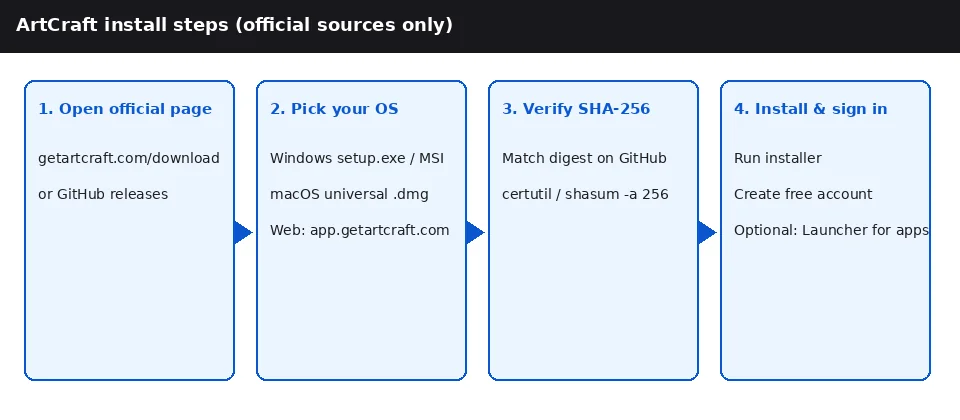
The official page labels the 64-bit installer for “most Windows 10 and 11 PCs.” Pick the MSI if you want a normal installed app; pick the portable zip if you want to keep the app in a folder and avoid an installer. Both are official release assets.
- Open the official page and choose “Standalone for Windows.” Use the 64-bit installer unless you specifically have an ARM PC or an old 32-bit machine. The equivalent direct path is the GitHub Releases page, where the Windows files are grouped under the release.
- Check the file name before you run it. A normal x64 build looks like
photocraft-0.20.1-windows-x64.msi; the portable version ends in-portable.zip. The ARM64 and x86 builds say so in the name. If the file is namedsetup.exe,installer.exeor something generic, stop and return to the official page. - Verify SHA-256. Open Command Prompt in the download folder and run
certutil -hashfile photocraft-0.20.1-windows-x64.msi SHA256. In PowerShell, runGet-FileHash .\photocraft-0.20.1-windows-x64.msi -Algorithm SHA256. Compare the 64-character result with the same file inSHA256SUMS.txt, or with the digest GitHub shows next to that asset. - Run the MSI. Windows may show a SmartScreen warning because the publisher is not a household name. The README says Windows installers are code-signed. If and only if the hash matches, choose “More info” and “Run anyway.” Do not disable Defender or add a broad exclusion to get past the warning.
- Choose the install scope and finish. Install for all users on a shared PC, or for the current user on a personal machine. Launch PhotoCraft after the installer finishes and confirm the version in the app.
- For the portable build, unzip and run. There is no installer and no uninstall entry. Keep the folder somewhere you control; deleting it removes the app. Documents and PSDs stay wherever you saved them.
Windows uninstall: Settings → Apps → Installed apps → PhotoCraft → Uninstall. If you used the portable zip, close the app and delete the extracted folder. Neither path removes your image files.
macOS: download, verify and install PhotoCraft
There is one universal macOS disk image for both Apple silicon and Intel, plus an optional command-line zip. You do not need to choose between an M-series and an Intel download.
- Download the universal DMG. On the official page choose “Standalone for macOS,” or use the GitHub release asset named
photocraft-0.20.1-macos-universal.dmg. - Verify the disk image. In Terminal, run
shasum -a 256 ~/Downloads/photocraft-0.20.1-macos-universal.dmg. Compare the result withSHA256SUMS.txtfrom the same release. Do not continue if it differs. - Open the DMG and drag PhotoCraft into Applications. Eject the disk image afterward. Launch the app from Applications, not from the mounted DMG, so macOS can track it correctly.
- Expect a normal first launch. The README says the macOS app is signed and notarized. If Gatekeeper still objects, re-check the hash and the source first, then use System Settings → Privacy & Security → “Open Anyway.” Do not paste a random
xattrcommand from a forum to remove quarantine on a file you have not verified. - The CLI is a separate optional zip. The
photocraft-cli-0.20.1-macos-universal.zipis for scripts, automation and MCP. The README shows how to unzip it and confirm its notarization withspctl --assess --type install -vv. Most editors do not need it.
Linux, FreeBSD, browser build and Launcher
Linux packages
Linux has the widest choice: AppImage, Debian package, RPM, tarball, Flatpak and Arch packages, on x86_64 and ARM64 (with some RISC-V builds on GitHub). Choose the format your distribution already manages; do not install two formats of the same version side by side.
- AppImage: make it executable and run it:
chmod +x photocraft-0.20.1-linux-x86_64.AppImage, then./photocraft-0.20.1-linux-x86_64.AppImage. If FUSE is missing, install your distribution’s FUSE 2 compatibility package or use the deb/rpm/Flatpak. - Debian/Ubuntu:
sudo apt install ./photocraft-0.20.1-linux-x86_64.deb. Remove it with the package manager, not by deleting files. - Fedora/RHEL/openSUSE:
sudo dnf install ./photocraft-0.20.1-linux-x86_64.rpm(or your distribution’s RPM command). - Flatpak:
flatpak install --user photocraft-0.20.1-linux-x86_64.flatpak, thenflatpak run ai.storyteller.photocraft. The README notes that the Flatpak needs the freedesktop runtime from Flathub. - Arch: install the
.pkg.tar.zstpackage withsudo pacman -U.
FreeBSD
The official page and GitHub provide an x86_64 FreeBSD tarball. It is plain binaries, not a package-manager install. Read the release notes and the README’s FreeBSD section for the runtime libraries, then unpack it into the prefix you use. Do not assume a Linux package will work on FreeBSD.
Browser build (self-hosted WebAssembly)
PhotoCraft compiles to WebAssembly, and the official release includes a static-site zip. This is not a hosted service and not an official “PhotoCraft online” login page. You download the zip, serve it yourself and open it in a modern browser. The ArtCraft AI studio at app.getartcraft.com is a different product; it is not PhotoCraft.
unzip photocraft-web-0.20.1.zip -d photocraft-web
cd photocraft-web && python3 -m http.server 8080
Then open http://localhost:8080. Do not double-click index.html from the file manager: a WebAssembly app normally needs an HTTP origin, and some browsers block modules loaded from file://. If you deploy it on a static host, keep the whole folder together so the WASM and asset paths resolve.
ArtCraft Launcher
The official PhotoCraft page offers a Launcher option (v0.13.0 when checked) as well as the standalone installers. The Launcher installs and updates PhotoCraft and the other Crafting Apps; if you install it later, the official page says it can find an existing PhotoCraft and keep it updated. GitHub’s launcher repository had a newer v0.14.0 tag, so the app page is not always the launcher’s newest version. Pick either the standalone build or the Launcher per machine, note which one you used, and keep the launcher itself current.
ArtCraft Launcher releases · Launcher install guide · getartcraft.com/download (ArtCraft studio, not PhotoCraft).
GitHub Releases and SHA-256 checksums
Every PhotoCraft release includes SHA256SUMS.txt, and GitHub displays a sha256: digest next to each asset in the expanded Assets list. The checksum proves that the file you have matches the release manifest. It does not make a mirror safe: if you download both the installer and the manifest from the same untrusted site, the pair can still be wrong.
- Download two things from the same release: the installer for your platform and
SHA256SUMS.txt. Stay on the GitHub release page or the official app page. - Compute the hash locally. On Windows use
certutil -hashfile <file> SHA256orGet-FileHash <file> -Algorithm SHA256. On macOS or Linux useshasum -a 256 <file>. - Compare the full value, not a prefix. A SHA-256 digest is 64 hexadecimal characters. Match the line for the exact file name; release assets for different architectures have different hashes.
- If it differs, delete and re-download once. If it still differs, do not run the file. Report it on the GitHub issue tracker and wait for a corrected asset.
This guide does not print a hash for a file it did not download and verify. The authoritative values live in the release’s SHA256SUMS.txt and on the GitHub asset listing, which are updated with each release. That is deliberate: a copied hash can go stale the day a new build ships.
PhotoCraft vs Photoshop: download and install differences (honest alpha)
The install itself is not where PhotoCraft loses to Photoshop. A single MSI or DMG is simpler than Creative Cloud. The difference is what you get after the install: Photoshop is a mature commercial editor with an Adobe ID, a subscription and a plug-in ecosystem; PhotoCraft is an early-alpha open-source editor that is still closing feature and workflow gaps.
| Dimension | PhotoCraft | Adobe Photoshop |
|---|---|---|
| Price and licence | Free and open source (MIT OR Apache-2.0). No licence key. | Paid Adobe subscription. Check Adobe’s current plan page for the price. |
| Installer path | One MSI, DMG, AppImage or package from the official page or GitHub Releases. | Adobe Creative Cloud desktop app manages the install and sign-in. |
| Account | No Adobe ID and no Creative Cloud membership for the editor. | Adobe ID plus an active subscription. |
| Updates | Download a newer official build, or let the ArtCraft Launcher manage it. | Creative Cloud updates the installed apps. |
| PSD / PSB | Opens and saves layered PSD/PSB per the docs. Verify fidelity on your own files. | Native format with the mature Adobe feature set. |
| Maturity | Early alpha. Authors: not yet a daily professional Photoshop replacement. | Mature commercial editor with a long plug-in and print ecosystem. |
| AI and plug-ins | Stated gaps in generative features and plug-in compatibility. | Generative Fill and a large third-party plug-in market. |
PhotoCraft’s README is unusually direct: much of Photoshop’s feature surface exists in some form, but the app is “not yet a Photoshop replacement for daily professional work.” It names AI/generative features, 15 missing tools, depth in typography and professional workflows, and plug-in compatibility as the biggest gaps. PSD and PSB open and save are real, but “opens” does not mean every layer style, smart object edge case or third-party effect survives a round trip.
Practical rule: if a client file is due this week, keep Photoshop as the delivery tool and test PhotoCraft on a copy. If you are evaluating a free, local, inspectable editor for non-critical work, Linux/FreeBSD, or CLI/MCP automation, the install is worth a trial. The dedicated comparison is PhotoCraft vs Photoshop; the product overview is the PhotoCraft guide.
Fake download sites: photocraftdownload.org and other lookalikes
The search results for “photocraft download” include pages that are not official. A domain such as photocraftdownload.org is an example: it is not ArtCraft, not Adobe and not this guide. Similar pages put “photocraft”, “download”, “free”, “crack” or “pc” in the hostname and wrap the file in a download manager, a survey or a fake support chat. We name the pattern so you can recognise it; we do not link any of these sites.
- “Adobe PhotoCraft” is not a product. PhotoCraft is an independent open-source project. Any page that calls it an Adobe app, or claims Adobe distributes it, is wrong.
- PhotoCraft is free, so “cracked”, “pre-activated” or “full version” is nonsense. There is no licence key to enter and no premium unlock. A page selling one is selling something else, possibly malware.
- A download manager or installer wrapper is a red flag. Official builds are the MSI, DMG, AppImage, package or zip itself. If you must first install a “downloader”, run a survey, or allow notifications to get the file, leave.
- No version, no checksum, no GitHub link. An official page tells you the version and points to release notes or SHA256SUMS.txt. A page with a countdown timer and a generic “Download Now” button does not.
- Phone support and remote-access requests. Neither Adobe nor the ArtCraft team needs remote access to your machine to install a free editor. Treat an unsolicited support pop-up as a scam.
This site is also not official. Open Creative Apps (opencreativeapps.com) is a guide; it is not getartcraft.com and cannot sell you a PhotoCraft licence. If you are already on a lookalike page, close it and start again at getartcraft.com/apps/photocraft. If you already ran an unknown installer: disconnect from the network, run a full malware scan, check browser extensions and startup items, and change any password you entered into that installer. Do not “test” a second mirror to see whether it is better.
Install troubleshooting
| Symptom | What to check |
|---|---|
| Windows SmartScreen warns about the MSI | Verify the SHA-256 first. The README says Windows installers are code-signed. If the hash matches, use “More info” then “Run anyway”; never turn off Defender globally to force an install. |
| macOS says the app cannot be opened | Confirm the DMG hash and that you downloaded from the official page or GitHub. A signed and notarized build should open normally; if Gatekeeper still blocks it, check System Settings → Privacy & Security and re-download rather than using a random bypass script. |
| The AppImage does not start on Linux | The AppImage needs FUSE. Install your distribution’s FUSE 2 compatibility package, use the .deb/.rpm/Flatpak instead, or run the AppImage with --appimage-extract-and-run. |
| The browser build shows a blank page | Serve the folder over HTTP instead of opening index.html from the file manager. From the unzipped folder run python3 -m http.server 8080, then open http://localhost:8080 in a modern browser. |
| The Launcher shows a different version | The official PhotoCraft page and GitHub Releases can lag each other. Compare both, note the version you want, and update the Launcher itself before installing. Do not mix a CLI from one release with a desktop app from another. |
| The SHA-256 does not match | Delete the file and download it again from the same official release. If it still does not match SHA256SUMS.txt, do not run it; report the asset on the GitHub issue tracker. |
| The installer will not run on this PC | Check architecture first: x64 versus ARM64 on Windows, universal on macOS, x86_64 versus aarch64 on Linux. A 32-bit Windows build will not run a 64-bit-only workflow well, and an x86_64 package will not run on ARM Linux. |
If the app launches but a file looks wrong, that is a product-fidelity question, not a download-integrity question. Compare the same file in Photoshop, keep the original, and check the PhotoCraft issue tracker. The comparison page covers PSD and maturity limits in more detail.
Who should download PhotoCraft — and who should wait
Try it if you want a free, local, open-source layered editor you can inspect; if you need Linux, FreeBSD or ARM64 builds; if you want CLI, JSON control or MCP automation; or if you are learning Photoshop-style workflows without a subscription. The installer is small enough to test on a spare machine or a secondary user account.
Wait if you need generative AI in the editor, a mature plug-in stack, advanced typography for production, predictable client PSD round-trips today, or a team workflow built around Adobe. The authors say it is not yet a daily professional replacement; believe them before you promise a client a delivery date.
Related pages
- PhotoCraft guide — what the editor is, PSD support, platforms and maturity
- PhotoCraft vs Photoshop — feature, price and workflow comparison
- Safe download guide — checksum, mirror and installer safety across the suite
- Crafting Apps hub — the full app list, including PhotoCraft and LightCraft
- LightCraft — the RAW photo library and develop sibling
- ArtCraft Launcher — suite installer and update path
- ArtCraft MCP — agent control for PhotoCraft and the other apps
Independent disclaimer
Open Creative Apps (opencreativeapps.com) is an independent guide and small orchard for the ArtCraft Crafting Apps. It is not Adobe, not the ArtCraft / storytold team and not getartcraft.com. We do not host, sell or distribute PhotoCraft installers, and we are not endorsed by Adobe or ArtCraft. Product names and logos belong to their respective owners and are used here for identification only. The official vendor page is getartcraft.com/apps/photocraft; the source is github.com/storytold/photocraft. If a page claims to be the official PhotoCraft site and is not one of those domains, it is not official.
Version and link notes can change after publication. Re-check the official page and the GitHub release before installing on a new machine, and keep the exact file name and checksum in your own notes if you support a team.
PhotoCraft download FAQ
Where is the official PhotoCraft download?
Use getartcraft.com/apps/photocraft for the curated installer list, or github.com/storytold/photocraft/releases for every build. The official suite installer is the ArtCraft Launcher offered on that same app page. This site hosts no files and links no mirrors.
Is PhotoCraft free?
Yes. PhotoCraft is open source under MIT OR Apache-2.0, and the official page says it is free for every platform listed. There is no licence key to buy. ArtCraft, the separate AI image and video studio, sells generation credits — that is not a PhotoCraft subscription.
Do I need an Adobe account or Creative Cloud?
No. PhotoCraft is an independent clean-room project from the ArtCraft / storytold team, not an Adobe product. You do not sign in with an Adobe ID and you do not install Creative Cloud to run it. Photoshop is a separate, paid Adobe product.
Which Windows file should I download?
Most Windows 10 and 11 PCs need the x64 MSI, or the x64 portable zip if you do not want an installer. Windows on ARM (Snapdragon and similar) needs the arm64 build. The x86 MSI and portable zip are for older 32-bit Windows. All three are official GitHub release assets.
Which macOS file should I download?
The universal DMG runs on both Apple silicon and Intel Macs; there is no separate M-series download. The CLI zip is optional and is for scripts, automation and MCP, not for normal editing. The README says the app and CLI are signed and notarized.
Can I run PhotoCraft in a browser without installing it?
There is an official WebAssembly build, but it ships as a static-site zip that you host yourself. There is no official hosted PhotoCraft web app at app.getartcraft.com — that address belongs to the separate ArtCraft AI studio. If you want a no-terminal path, use the ArtCraft Launcher on the official PhotoCraft page.
How do I verify the PhotoCraft SHA-256 checksum?
Download SHA256SUMS.txt from the same GitHub release as the installer. On Windows run certutil -hashfile <file> SHA256, or Get-FileHash in PowerShell. On macOS or Linux run shasum -a 256 <file>. Compare all 64 hexadecimal characters with the manifest; a matching file name alone is not verification.
Why does the official page show 0.19.0 when GitHub shows 0.20.1?
The website and the GitHub release train are published separately. On 3 November 2026 the official page offered standalone 0.19.0 and Launcher v0.13.0, while GitHub published v0.20.1. Both are official. Pick one channel, note the version you installed, and re-check before updating; do not mix files from different versions.
Is photocraftdownload.org an official site?
No. photocraftdownload.org and similarly named pages are not ArtCraft, not Adobe and not this guide. The only official download hosts are getartcraft.com and github.com/storytold. We name the lookalike so you can avoid it, and we do not link it.
Is PhotoCraft a Photoshop replacement?
Not yet. Its authors call it early alpha and say it is not yet a Photoshop replacement for daily professional work. Layered PSD/PSB open and save exist, but verify your own files. The biggest stated gaps are AI/generative features, missing tools, typography depth and plug-in compatibility.
Is opencreativeapps.com the official PhotoCraft site?
No. Open Creative Apps is an independent guide and small orchard for ArtCraft Crafting Apps. We are not getartcraft.com, not the ArtCraft team and not Adobe. We do not host, sell or distribute installers; every download link points to the official page or the storytold GitHub repository.
Sources
Every fact on this page comes from the pages below, checked on 3 November 2026.