LightCraft is not Adobe Lightroom. Independent open-source Crafting App from the ArtCraft / storytold team. This page is a third-party guide — not getartcraft.com, not lightcraft.run, and not an Adobe site.
LightCraft: Local Photo Library & RAW Developer
TL;DR: LightCraft is ArtCraft’s Lightroom-style Crafting App and a free, local Adobe photo library alternative: a photo library and non-destructive RAW developer written in Rust. It is open source (MIT or Apache-2.0), it is alpha, and it is not Adobe Lightroom. Prefer the installer on getartcraft.com/apps/lightcraft or GitHub storytold/lightcraft. The native app keeps the catalog on your machine — no account and no cloud sync.
Short answers
- LightCraft is not Adobe Lightroom.
- LightCraft is open source (MIT or Apache-2.0) from the ArtCraft / storytold team.
- LightCraft is alpha. The README puts day-to-day readiness near 61% for the whole product and about 51% for a typical working photographer.
- LightCraft is the ArtCraft ecosystem entry for a local RAW library. PhotoCraft is the layered pixel editor. ArtCraft is the separate AI studio.
Official LightCraft pageGitHub storytold/lightcraftBrowser host lightcraft.runFull download safety guide
Page revised: · Site stamp: · Checked LightCraft v0.18.0 on GitHub, the official page (0.17.0 files) and Launcher v0.13.0; lightcraft.run is separate.
What LightCraft is
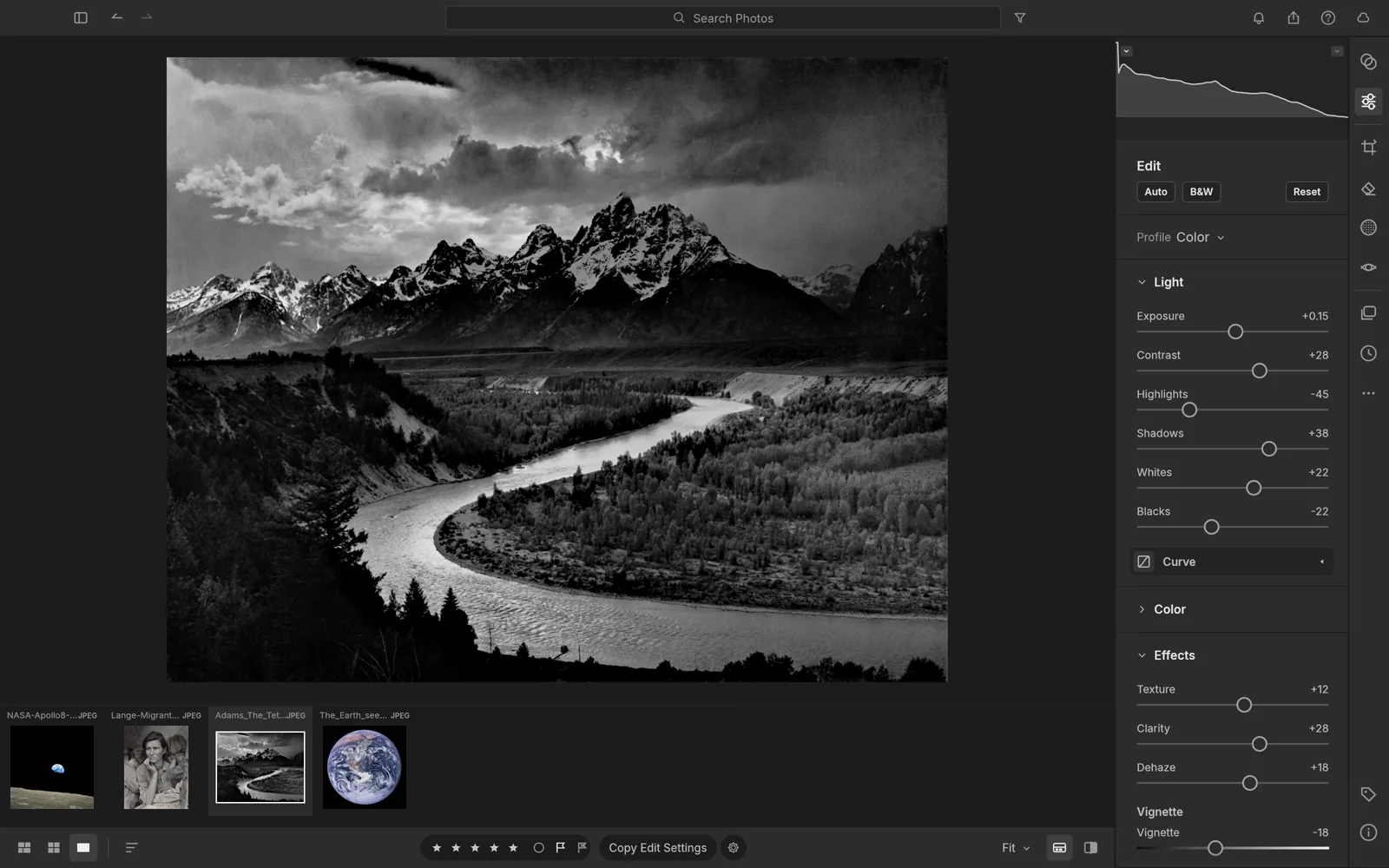
LightCraft is one Crafting App in the ArtCraft suite: a darkroom-style library for culling and developing stills, not a layered Photoshop-style compositor and not Adobe’s Lightroom. The official page describes a non-destructive, scene-referred pipeline, the usual light and color controls, precise masks, native RAW decoding, and a library meant for large catalogs. Everything stays on the computer you install it on unless you separately open a browser host.
Treat the maturity numbers as the authors’ own scorecard, not a lab test from this site. By their README, JPEG and DNG plus many Sony, Panasonic, Fujifilm, Nikon and older Canon RAW files are the comfortable set. Measured camera color calibration is still missing for much of the lineup, some compressed RAW variants only show the embedded preview, their own lens profiles are unfinished, and Book, Map and video editing are not in the app. HDR editing exists; HDR display does not. That is a useful local culling and develop tool with gaps, not a drop-in replacement for a studio that already lives in Lightroom Classic or Lightroom cloud.
| Topic | Fact (sourced) |
|---|---|
| Positioning | Official page: a fast photo library and non-destructive RAW developer, written from scratch in pure Rust. Tagline: “Your photos. Your pixels. Your machine.” Not an Adobe product. |
| Develop | README: scene-referred, wide-gamut, 32-bit float pipeline. Exposure through blacks, white balance, vibrance, an 8-band color mixer, 3-way color wheels, tone curves, texture, clarity, dehaze, vignette and grain. Originals stay untouched. |
| Masks | Brush, linear and radial gradients, luminance and color range, plus sky, subject and background. Object and Describe masks need an optional model you install separately; subject, sky and background stay classical heuristics. |
| RAW | Own Rust decoders for DNG, CR2, CR3 (not every variant), ARW, NEF, RAF including X-Trans, RW2, PEF and ORF, plus JPEG, PNG, TIFF, WebP and more. Compressed Olympus and some CR3 files still fall back to the embedded preview. Camera color profiles are incomplete. |
| Library | Local albums, folders, ratings, flags, color labels, field search and virtualized grids. The catalog is an append-only log on your machine. The native app has no cloud catalog. |
| Status | Alpha, “in development” on the official page. README (checked with this page): about 82% by feature count, nearer 61% as a whole day-to-day product, about 51% for a typical working photographer and about 65% for casual use. |
| License | MIT or Apache-2.0, at your option (README License section). |
| Platforms | Official page lists macOS, Windows, Linux, FreeBSD and a WebAssembly zip. GitHub’s latest release was v0.18.0 on 3 November 2026; the official standalone list still showed 0.17.0 files when checked. Desktop installers are signed (Windows) or signed and notarized (macOS universal), per the README Downloads section. |
| Automation | Same command registry for the UI, CLI, a JSON control channel and an MCP server (`lightcraft-cli mcp`). An agent can import, cull, develop, mask and export. That is local control, not a cloud Lightroom sync. |
Primary sources: getartcraft.com/apps/lightcraft, github.com/storytold/lightcraft README. The browser host lightcraft.run is a separate site.
LightCraft vs Lightroom
Use this when the question is “can I leave Lightroom,” not when you only need the product name. Adobe ships more than one Lightroom: Classic keeps a local catalog, and the cloud-branded Lightroom syncs a library across desktop and mobile. LightCraft matches the local-library idea more than the cloud one, and it is earlier than either Adobe app.
| Dimension | LightCraft | Adobe Lightroom |
|---|---|---|
| Price | Free app. MIT or Apache-2.0. No subscription for the native app. | Paid subscription. See Adobe Lightroom for the current plan. This guide does not quote a price that was not re-checked today. |
| Platform | macOS (universal), Windows, Linux (AppImage, Flatpak, deb, rpm, tar), FreeBSD, and a WebAssembly build. GitHub’s latest release: 0.18.0; the official page still listed 0.17.0 files when checked. | Commercial desktop, mobile and web apps from Adobe, tied to a Creative Cloud plan. |
| Catalog | Local library: albums, nested folders, ratings, flags, labels, field search, virtualized grids. The catalog is an append-only log you can back up yourself. | Lightroom Classic uses a local catalog. The cloud Lightroom app uses a synced cloud library. Neither catalog opens inside LightCraft. |
| RAW | In-house decoders for common camera RAW types, with honest holes: some CR3 variants and compressed Olympus files use the embedded preview, and measured per-camera color calibration is incomplete. Read the repo’s raw-parity notes before a migration. | Mature camera support, Adobe profiles and a long lens-profile library. |
| Cloud sync | Native app: no account, no cloud, no telemetry, no subscription. The independent browser host stores a library in the browser and calls that storage experimental. | Cloud sync and mobile copies are a core Lightroom path, especially outside Classic. |
| Maturity | Alpha. Authors: ~82% by feature count, ~61% as a day-to-day product, ~51% for a typical working photographer. Book, Map, video editing and direct printing are among the gaps. | Mature commercial catalog and develop ecosystem, with a support and profile stack. |
For the AI studio versus Firefly, use ArtCraft vs Adobe. For layered PSD work, use PhotoCraft and PhotoCraft vs Photoshop.
LightCraft, PhotoCraft and the ArtCraft suite
People mix the names because they share “Craft” and a team. They are different jobs:
- LightCraft — local photo library and non-destructive RAW develop (Lightroom-oriented). Cull a shoot, rate, mask, export JPEGs or a contact sheet.
- PhotoCraft — layered pixel editor (Photoshop-oriented): layers, masks, type, PSD/PSB. Early alpha on its own terms. Use it when the file is a composite, not a camera roll.
- ArtCraft — the AI image and video studio (canvases and generative models). It is not the RAW catalog, and LightCraft’s “no account” rule does not describe ArtCraft’s generation credits.
Install the desktop apps separately or together through the ArtCraft Launcher. They do not become one Adobe-style cloud library. Agent control is per app: LightCraft exposes lightcraft-cli mcp; PhotoCraft has its own CLI/MCP. Start from the ArtCraft overview, the Crafting Apps hub, and the MCP guide if you want an agent in the loop. Keep the README’s MCP doc as the source of command names — this page does not replace it.
MCP, CLI and Lottie (checked v0.18.0)
LightCraft is drivable by an agent without a cloud account. The same command registry backs the UI, the CLI, a JSON control channel and an MCP server. The practical setup is short:
- Install the desktop app from the official page or GitHub, and confirm the version.
- Run
lightcraft-cli mcpfrom the installed CLI package and point your MCP client at that local server. - Use the repository’s MCP documentation for the current command names and permissions; this guide does not replace the README.
This is local control, not Lightroom cloud sync: the catalog stays on your machine. Lottie is not a LightCraft export format — it is an EffectCraft interchange path. If the job is web/app animation rather than RAW development, start with EffectCraft and its MCP guide.
Version note: GitHub published v0.18.0 on 3 November 2026 while the official standalone list still showed 0.17.0 files. EffectCraft and VectorCraft are on their own v0.21.0 release that day; LightCraft follows a separate release train. Re-check the page before installing; do not mix a CLI from one release with a desktop app from another.
Safe download
This site does not host installers. Four paths, and only these, are the ones to use. Check the version and the SHA-256 on the day you install; the numbers below are the ones visible on 3 November 2026.
- Official app page (preferred). Open getartcraft.com/apps/lightcraft. That page offers the ArtCraft Launcher (shown as v0.13.0) and standalone installers for LightCraft 0.18.0 or the 0.17.0 files still listed on the official page: macOS universal disk image, Windows 64-bit, Linux Flatpak, FreeBSD, a WebAssembly zip, a CLI zip, and SHA256SUMS.txt. Come back to the same URL for updates.
- GitHub source and every build. Repository: github.com/storytold/lightcraft. Releases: github.com/storytold/lightcraft/releases. The README lists Windows MSI and portable zips (x64, arm64, x86), a notarized macOS universal DMG, Linux AppImage, Flatpak, deb, rpm and tar (x86_64 and aarch64), a FreeBSD tarball, and
lightcraft-web-*.zip. Match the file to SHA256SUMS.txt before you run it. - Browser host, if you want no install. lightcraft.run answered HTTP 200 on 3 November 2026 and describes itself as an independent site hosting the open-source web build (it reported v0.8.0), not affiliated with or endorsed by ArtCraft. Manual edits stay in the browser; the persistent library is experimental — keep camera originals elsewhere and use one tab. Optional AI on that site uses credits or your own key. That AI is not part of the no-account desktop app. Do not treat lightcraft.run as the official desktop download.
- Launcher and this site’s checklists. The suite installer is documented on the ArtCraft Launcher guide. Published GitHub tags: storytold/craft-launcher releases. Prefer the launcher version printed on the official LightCraft page if it is newer than an older tag linked from elsewhere on this site. Risk notes for mirrors and “cracked” builds: How to download Crafting Apps safely.
Skip third-party “cracked Lightroom” packs and random repacks. LightCraft is already free — there is nothing to unlock. If an installer asks you to disable OS protections without showing the official URL and checksum, stop.
Who LightCraft is for
- Photographers who want a local, inspectable RAW library and can accept alpha camera-profile gaps.
- Linux, FreeBSD or agent/MCP workflows where a Lightroom install is a poor fit.
- People comparing a free develop app with a subscription before they move a catalog.
Wait, and keep Lightroom, if you need mobile cloud sync, a finished lens-profile set for every body, Book or Map modules, or a deadline migration of an existing catalog. Export finished images and test a copy of a shoot first.
Related Crafting Apps
- LightCraft vs Lightroom — local catalog and cloud-sync verdict
- PhotoCraft — layered pixel editor sibling
- PhotoCraft vs Photoshop
- ArtCraft — AI image and video studio
- ArtCraft Launcher
- ArtCraft MCP
- Crafting Apps hub
- ArtCraft vs Adobe
- Safe download guide
LightCraft FAQ
Is LightCraft Adobe Lightroom?
No. LightCraft is not Adobe Lightroom. It is an open-source Crafting App from the ArtCraft / storytold team (github.com/storytold/lightcraft). This page is an independent guide and is not affiliated with Adobe or the ArtCraft team.
Is LightCraft open source?
Yes. LightCraft is open source under MIT or Apache-2.0. Source and releases are at github.com/storytold/lightcraft. The easiest installer list is getartcraft.com/apps/lightcraft. This site does not host the binaries.
Is LightCraft still alpha?
Yes. LightCraft is alpha. The README calls it young and moving fast, and puts day-to-day readiness near 61% for the whole product and about 51% for a typical working photographer (about 82% if you count features, about 65% for casual use). The official page still says “In development.” Do not retire a paid Lightroom catalog until you have tested your own cameras.
Where does LightCraft sit in the ArtCraft ecosystem?
LightCraft is the ArtCraft ecosystem entry for a local photo library and non-destructive RAW develop. PhotoCraft is the sibling layered pixel editor (Photoshop-oriented). ArtCraft itself is the separate AI image and video studio. They share a team and the ArtCraft Launcher; they do not share an Adobe-style cloud catalog.
Where do I download LightCraft safely?
Use getartcraft.com/apps/lightcraft or GitHub releases for storytold/lightcraft, and check SHA-256. You can also install it from the ArtCraft Launcher offered on that official page (listed as Launcher v0.13.0 next to LightCraft 0.17.0 when checked on 3 November 2026; GitHub already had v0.18.0). lightcraft.run is a separate, independent browser host of a web build — not the official ArtCraft installer. Skip “cracked Lightroom” mirrors. LightCraft is free.
Does LightCraft sync a cloud catalog like Lightroom?
The native app does not. Official materials say no account, no cloud, no telemetry and no subscription, and the catalog is a local append-only log. lightcraft.run keeps an experimental library in the browser and tells you to keep originals elsewhere. Adobe Lightroom’s cloud library and mobile sync are a different product.
Sources
Every fact on this page comes from the pages below, checked on 3 November 2026.