Independent guide. Open Creative Apps is not affiliated with Adobe Inc. or the ArtCraft / storytold team. Downloads only via getartcraft.com or official GitHub storytold releases.
Crafting Apps Hub
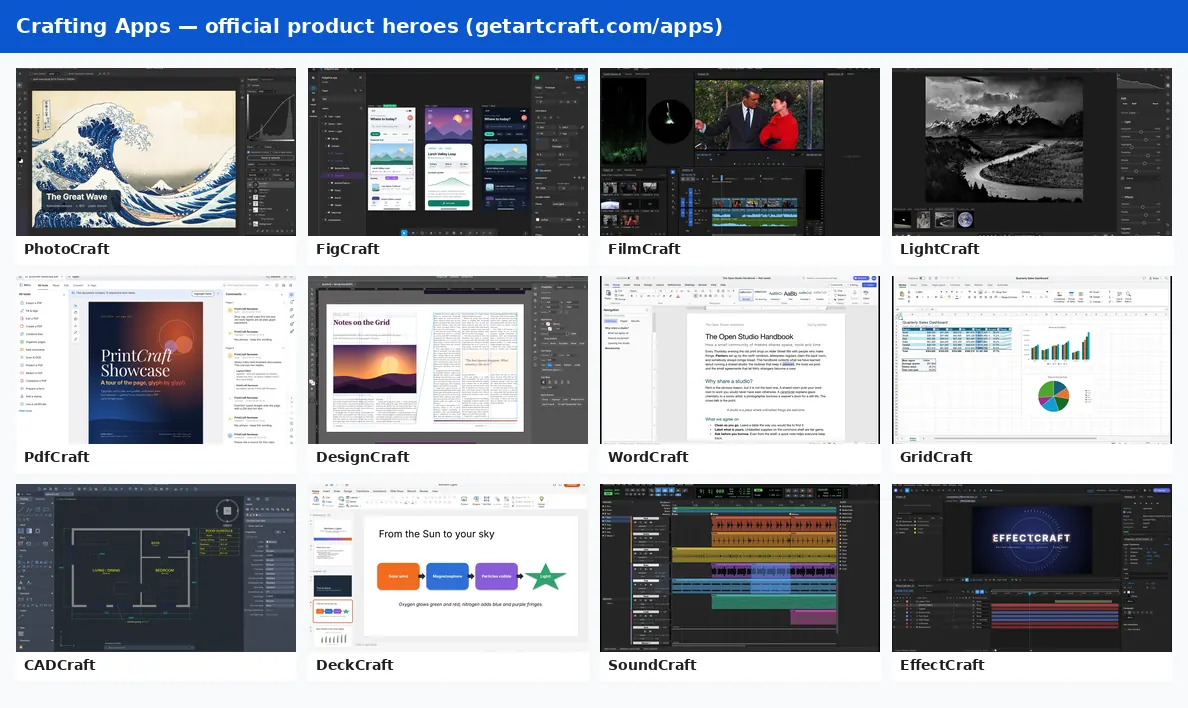
Independent navigation hub for ArtCraft and the related Crafting Apps — each entry below has a definition, official download or GitHub link, an on-site deep guide, and a one-line "vs who" so you can choose without treating this site as the vendor.
- FilmCraft is part of ArtCraft Crafting Apps; it is not CapCut.
- Downloads only from getartcraft.com or official GitHub storytold releases.
- This site is an independent guide, not the vendor — we do not host installer binaries.
- Prefer the safe download guide or ArtCraft Launcher for suite installs.
Safe download guideArtCraft vs Adobe
Last checked:
Quick index
| App | Status | On-site guide |
|---|---|---|
| ArtCraft | v0.41.0 | ArtCraft guide |
| PhotoCraft | Early alpha | PhotoCraft guide |
| FigCraft | Early alpha | FigCraft guide |
| FilmCraft | In development | FilmCraft guide |
| LightCraft | In development | LightCraft guide |
| EffectCraft | In development | EffectCraft guide |
| VectorCraft | In development | VectorCraft guide |
| PdfCraft | Early alpha | PdfCraft guide |
| DesignCraft | In development | DesignCraft guide |
| WordCraft | In development (~60% ready) | WordCraft guide |
| GridCraft | In development | GridCraft guide |
| CADCraft | In development | CADCraft guide |
| DeckCraft | In development (~55% ready) | DeckCraft guide |
| SoundCraft | Pre-alpha (~40% ready) | SoundCraft guide |
| ArtCraft Launcher | v0.5.1 | ArtCraft Launcher guide |
| ArtCraft MCP | Docs | ArtCraft MCP guide |
How to use this hub
Start here when you know the product family but not which seat to open. If you need the AI studio, begin with ArtCraft. If you need a local editor or office-style seat, skim the matching Crafting App below, then follow the on-site deep guide for platforms, readiness and safe links. For Adobe-style shopping questions, keep ArtCraft vs Adobe open in another tab so price and license stay grounded in cited sources.
This hub is deliberately denser than a directory table: each app section is meant to answer "what is it", "where is official", "where do we document it" and "what is the usual competitor" without sending you through marketing fluff. When an app is early alpha or in development, treat that label as a hard readiness signal — useful for learning and experimentation, not a promise of production parity.
Each Crafting App in detail
Every app below repeats four facts: what it is, where to get it officially, which page on this site goes deeper, and who it is usually compared with. Status labels come from official materials checked on 30 October 2026. Links point only at getartcraft.com or github.com/storytold repositories; we never host installer binaries on Open Creative Apps.
ArtCraft (v0.41.0)
ArtCraft is the open-source AI image and video studio at the center of the suite: compose shots on 2D and 3D canvases, then render with dozens of models under MIT or Apache-2.0.
- Official: getartcraft.com · GitHub storytold/artcraft
- On this site: ArtCraft deep guide
- Vs who: Vs Adobe Firefly / Creative Cloud AI tools: free and local-first with BYO compute, but still pre-1.0 — not a drop-in Creative Cloud subscription replacement.
PhotoCraft (Early alpha)
PhotoCraft is a Rust image editor that opens and saves layered PSD/PSB, with layers, masks, adjustments and brushes aimed at Photoshop-familiar workflows.
- Official: getartcraft.com/apps/photocraft · GitHub storytold/photocraft
- On this site: PhotoCraft deep guide
- Vs who: Vs Adobe Photoshop: similar document model and muscle memory, but early alpha — developers say it is not yet a daily professional replacement.
FigCraft (Early alpha)
FigCraft is an open-source interface design and prototyping app for screens, components and local-first UI work — it is not Figma and does not claim Figma file parity.
- Official: getartcraft.com/apps/figcraft · GitHub storytold/figcraft
- On this site: FigCraft deep guide
- Vs who: Vs Figma: local/open alternative for UI mockups; skip it if you need real-time multiplayer and the Figma plugin ecosystem today.
FilmCraft (In development)
FilmCraft is a local timeline NLE in the Crafting Apps family (keyframing, captions, ProRes/DNxHR paths) — it is part of ArtCraft, not CapCut.
- Official: getartcraft.com/apps/filmcraft · GitHub storytold/filmcraft
- On this site: FilmCraft deep guide
- Vs who: Vs CapCut / Premiere Pro: free local Premiere-style timeline vs CapCut social templates or Adobe Premiere production suites; still early.
LightCraft (In development)
LightCraft is a local photo library and non-destructive RAW developer for organizing and finishing stills without a cloud catalog lock-in.
- Official: getartcraft.com/apps/lightcraft · GitHub storytold/lightcraft
- On this site: LightCraft deep guide
- Vs who: Vs Adobe Lightroom: local library + develop tools; choose Lightroom when you need Adobe Sensei, mobile sync and mature catalog scale.
EffectCraft (In development)
EffectCraft is the suite’s free open-source motion-graphics and VFX compositor: compositions, layers, keyframes, 3D cameras and lights, effects and Lottie import/export.
- Official: getartcraft.com/apps/effectcraft · GitHub storytold/effectcraft
- On this site: EffectCraft deep guide
- Vs who: Vs Adobe After Effects: familiar compositing model and a free local app, but alpha — it cannot open .aep/.aepx and AE plug-ins do not run.
VectorCraft (In development)
VectorCraft is the suite’s Illustrator-oriented vector editor (formerly DrawCraft): pen and path tools, exact booleans, gradients, live effects, type and SVG/PDF/.ai export. It is not the crates.io vectorcraft crate.
- Official: getartcraft.com/apps/vectorcraft · GitHub storytold/vectorcraft
- On this site: VectorCraft deep guide
- Vs who: Vs Adobe Illustrator: free local vector drawing with familiar tools, but alpha — reliable .ai round-tripping and plug-in parity are still gaps.
PdfCraft (Early alpha)
PdfCraft is an Acrobat-oriented PDF workbench for reading, organizing, combining, splitting and securing PDFs as a local Crafting App.
- Official: getartcraft.com/apps/pdfcraft · GitHub storytold/pdfcraft
- On this site: PdfCraft deep guide
- Vs who: Vs Adobe Acrobat: free/open PDF seat for common file chores; Acrobat wins for enterprise signing workflows and long-tail Acrobat features.
DesignCraft (In development)
DesignCraft is an InDesign-oriented page layout and publishing editor for multi-page documents, with IDML-minded interchange goals while still in development.
- Official: getartcraft.com/apps/designcraft · GitHub storytold/designcraft
- On this site: DesignCraft deep guide
- Vs who: Vs Adobe InDesign: open layout seat for experimenting locally; stay on InDesign for print production, GREP styles and agency template libraries.
WordCraft (In development (~60% ready))
WordCraft is a Word-oriented processor built around .docx for drafting and editing documents inside the Crafting Apps suite.
- Official: getartcraft.com/apps/wordcraft · GitHub storytold/wordcraft
- On this site: WordCraft deep guide
- Vs who: Vs Microsoft Word: free .docx seat for light work; Word remains stronger for enterprise collaboration, macros and full typography suites.
GridCraft (In development)
GridCraft is an Excel-oriented spreadsheet with native .xlsx support for tables, formulas and charts — macros are not full parity yet.
- Official: getartcraft.com/apps/gridcraft · GitHub storytold/gridcraft
- On this site: GridCraft deep guide
- Vs who: Vs Microsoft Excel: open .xlsx seat for everyday sheets; Excel wins for VBA, Power Query and heavy enterprise models.
CADCraft (In development)
CADCraft is an AutoCAD-style drafting app for 2D CAD work; note that DWG save can drop unmodelled entities, and it is unrelated to getcadcraft.com.
- Official: getartcraft.com/apps/cadcraft · GitHub storytold/cadcraft
- On this site: CADCraft deep guide
- Vs who: Vs AutoCAD: free drafting experiment for simple plans; AutoCAD (or LibreCAD/QCAD peers) still own production CAD standards and vertical toolsets.
DeckCraft (In development (~55% ready))
DeckCraft is a PowerPoint-oriented presentation seat with .pptx open/save goals. It is not affiliated with deckcraft.com.
- Official: getartcraft.com/apps/deckcraft · GitHub storytold/deckcraft
- On this site: DeckCraft deep guide
- Vs who: Vs Microsoft PowerPoint / Google Slides: local open deck editor for drafts; keep PowerPoint for master templates, presenters and enterprise branding.
SoundCraft (Pre-alpha (~40% ready))
SoundCraft is a Pro Tools–style DAW seat in the suite for multitrack audio work. It is not Harman soundcraft.com.
- Official: getartcraft.com/apps/soundcraft · GitHub storytold/soundcraft
- On this site: SoundCraft deep guide
- Vs who: Vs Avid Pro Tools / other DAWs: early open DAW experiment; use Pro Tools, Reaper or Ableton when you need production plugins and session interchange.
ArtCraft Launcher (v0.5.1)
ArtCraft Launcher (craft-launcher) installs and updates PhotoCraft, FigCraft, FilmCraft and other Crafting Apps from official channels in one place.
- Official: getartcraft.com/apps · GitHub storytold/craft-launcher
- On this site: ArtCraft Launcher deep guide
- Vs who: Vs hunting each GitHub release by hand: Launcher is the suite installer — still download only from official GitHub / getartcraft.com, never “cracked launcher” mirrors.
ArtCraft MCP (Docs)
ArtCraft MCP documents how agents (for example Claude or Cursor) can drive Crafting Apps through the Model Context Protocol control surfaces the team publishes.
- Official: PhotoCraft MCP docs (GitHub) · PhotoCraft control protocol
- On this site: ArtCraft MCP deep guide
- Vs who: Vs one-off scripts / unofficial APIs: prefer official MCP docs on the app repos when you want agent automation without random third-party bridges.
Safe downloads
Prefer the safe ArtCraft download guide (checksums, Windows / macOS / web / Linux notes) or ArtCraft Launcher. Skip cracks and third-party mirrors — Crafting Apps are free and open source. If a search result offers a "premium unlocked" pack, treat it as malware risk: paid ArtCraft plans buy generation credits on getartcraft.com, not a closed installer.
After install, keep using official release channels for updates. Launcher v0.5.1 and the individual app release pages are the supported paths; random mirror sites and SEO doorways are not. When in doubt, compare the SHA-256 digest on GitHub with the file you received.
Suite catalog: getartcraft.com/apps. GitHub org: github.com/storytold.
Also useful
ArtCraft vs Adobe · FilmCraft vs CapCut · FilmCraft vs Premiere · FilmCraft vs Concat · FigCraft vs Figma · PhotoCraft vs Photoshop · CapCut Craft clarify · About this site
Crafting Apps hub FAQ
What are Crafting Apps?
Crafting Apps are companion desktop (and often web) apps in the ArtCraft ecosystem — PhotoCraft, FilmCraft, FigCraft, WordCraft, LightCraft, PdfCraft, DesignCraft, GridCraft, CADCraft, DeckCraft, SoundCraft and related tools. Each has its own installer and GitHub repository under storytold. Browse this hub or getartcraft.com/apps.
How do they relate to ArtCraft?
ArtCraft is the AI image and video studio. Crafting Apps are separate open-source seats from the same team for editing, design, layout, CAD, audio and more. You can use ArtCraft alone, install Crafting Apps via ArtCraft Launcher, or mix both. They are not Adobe products and are not CapCut or Figma.
Where to download safely?
Only from getartcraft.com (including /apps and /download) or official GitHub releases under github.com/storytold. Prefer the safe download guide on this site and ArtCraft Launcher releases. Avoid third-party mirrors and anything labeled cracked — the suite is free and open source.